

If in the past, it is not easy to break our phone; that’s the matter of smart and luck;
If now, that could be a piece of cake, while setting the iPhone back to 1 January, 1970, and then restart it.
Though Apple has said that it is aware of the problem and will be fixing it in an update soon, is there something explanation why ‘January, 1970’ bug will break the iPhone?
Here is our answer.
Who found the ‘January, 1970’ bug?
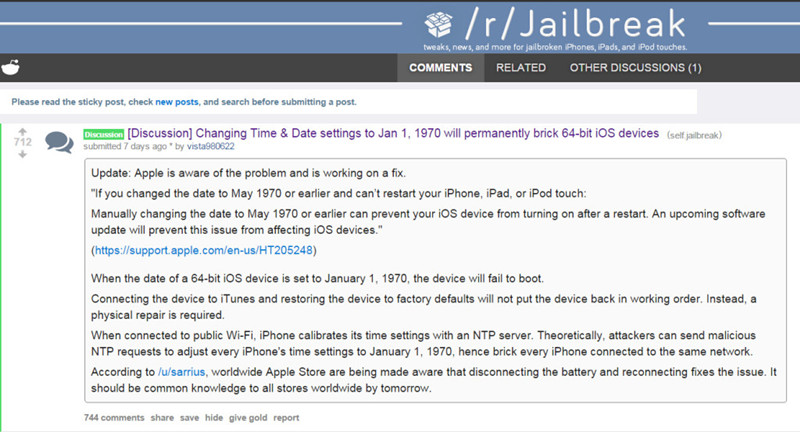
At first, here released a reddit post from vista980622; and then some of the viewers reset their iPhone; and then iPhone became a brick… Practice makes perfect.
What has Apple responded to ‘January, 1970’ bug?
— Apple has officially acknowledged iPhone bricking ‘1970 date’ bug, saying if manually changing the date to May, 1970 or earlier, iPhone would encounter the same bricking problem.
— Apple will be fixing it in an update soon. If you have this issue, contact Apple Support for assistance. It’s suggested that some people have been able to get full device replacement.
Why ‘January 1st, 1970’ Bug?
Probably, some of them have got to know that the computer time and programming languages time are set from January 1st, 1970. But why his date?
As most programming language time was originated from UNIX system, which took the date 0’clock, January 1st, 1970 as the encom passingera, or starting time. And iOS system has taken UNIX as timestamp.
Any other bugs?
That’s the bug for year of 2038, while it’s only for the 32-bit devices and makes no difference to 64-bit devices.
What devices will be caught by ‘January, 1970’ bug?
System Version: iOS 8.0 – iOS 9.3 beta 3, including 9.2.1
Hardware Unit: powered by 64-bit (A7 – A9X) processor.
— A7: iPhone 5s、iPad mini 2、iPad mini 3
— A7 variant:iPad Air
— A8:Apple TV 4G、iPad mini 4、iPhone 6、iPhone 6 Plus、iPod Touch 6G;
— A8X:iPad Air 2;
— A9:iPhone 6s、iPhone 6s Plus;
— A9X:iPad Pro;
How to do if with ‘January, 1970’ bug?
— Disassemble the iPhone and take out the battery, let it alone for 10 minutes; (Tip: thus you will be disqualified for official warranty)
— If fully charged, please wait for several hours patiently. When the UNIX timestamp is greater than zero, it will boot normally.
Wanna have a try on ‘January, 1970’ bug?
Why not go for the experience iPhone on Apple Store? No matter what operations you do on them, it would not work and automatically recover.
Had your iPhone bricked? Just a joke:)

 blog.easyacc.com