
So I think there comes a point when every tech blogger gets the urge to let everyone know what they carry on the regular. After several reviews and the iPhone challenge I wanted to do something a little different and kind of fun. I’m not going over every piece of tech I own, instead I just want to highlight the devices I like enough to either carry on my person or put in my tech bag that I travel with on the regular. The higher dollar items like phones or laptops you can pick up anywhere for the more obscure items I’ll leave links so you can check them out.
Outside of the bag
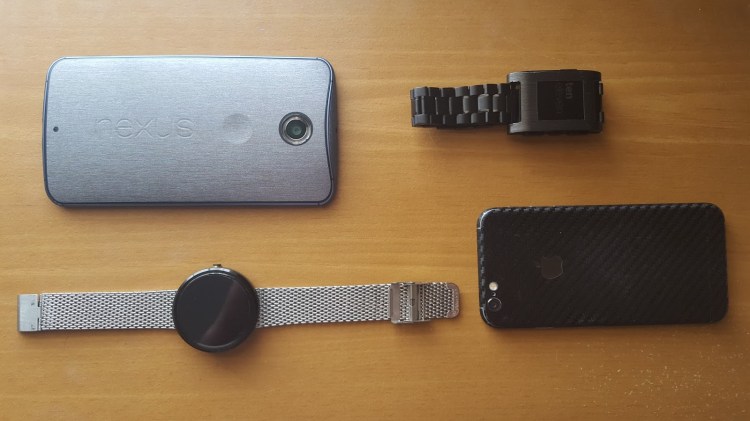
So for the time being I’m on team Android so my set up is the Motorola made Nexus 6 and the Moto 360. I love the Nexus 6 for it’s giant QHD screen and great sounding front facing speakers. I’m also a huge fan of the Nexus line in general because it’s pure Android the way Google intended instead of a tweaked version with an OEM overlay on it. Protecting my Nexus 6 is the Skinomi Brushed steel Techskin which offers basic protection and looks awesome without adding bulk to the already huge phone.
Paired to the Nexus 6 right now is my Motorola Moto 360. I love the way this watch looks, it’s not just a smart watch it’s also a great looking watch in general. The best part is it actually works better now than when I first got it and it’s $100 dollars less only running $200 right now on Amazon. To make mine stand out a little bit from the crowd I replaced the leather band with this awesome Stainless steel mesh band.
After my iPhone challenge I decided to keep the iPhone 6 as a back up or a switch out as my daily driver. I’m now a fan of iOS and I want to have both an iOS device and an Android device so I can stay up to date on both operating systems. Protecting the iPhone 6 is another skin, this time a Armorsuit Carbon fiber skin. Once again I love skins because they offer basic protection from scratches or small drops without ruining all of the work an industrial design team put into designing the device.
To pair with the iPhone when needed I carry the classic Pebble smart watch. It’s extremely affordable at just $99, it works on both Android and iOS, and it has an excellent multiple day battery life. The Pebble is great although out of the box it looks more like a toy than a piece of tech. It’s easy to remedy this however for less than $20 dollars I added this nice black stainless watch band and this sweet brushed onyx wrap from Slick Wraps. The difference is huge and it turns the look around completely.
What’s in my bag?
Now we move on to my tech bag and the items I carry in it on a regular basis. Let’s start with the bag itself. My bag is the Targus legend IQ, a backpack designed to carry up to a 16″ laptop and several accessories. It looks great without being too flashy, it’s light and comfortable to carry, and it’s extremely functional with a laptop pocket a sleeve for a tablet and pockets for everything. It even comes with a small pocket ideal for the iPhone on the inside with a headphone jack that leads to the strap so you can attach headphones to the pack itself.
Devices
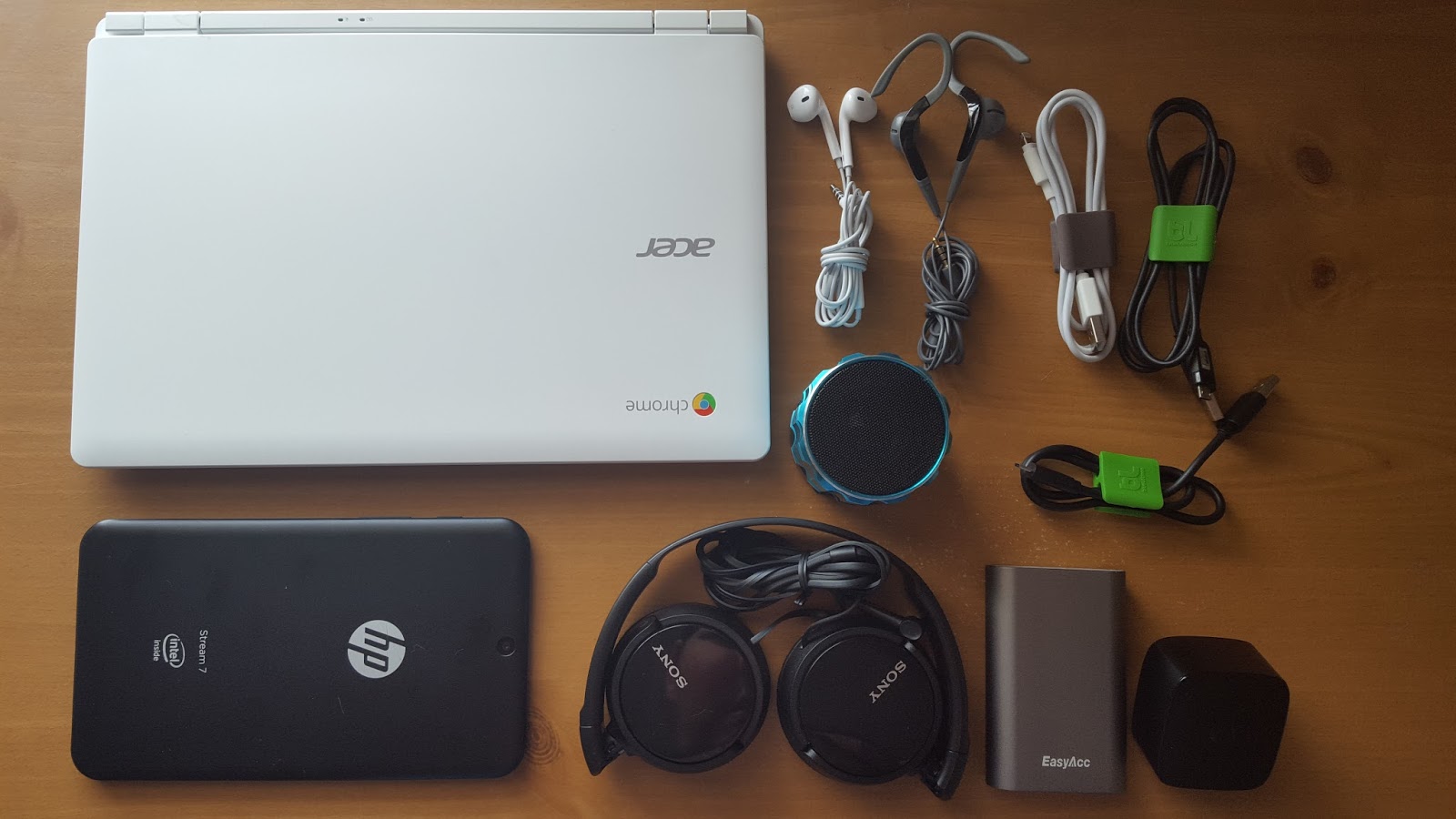
Inside my bag is my Acer Chromebook 11, which is the perfect laptop for the basics like blogging and managing social media. If you know anything about Chromebooks or Chrome OS, it’s basically a completely cloud and web based computer. It’s similar to a tablet but with the functionality of a laptop. This laptop is great on the go it weighs right at two pounds and has battery life that easily lasts up to eight hours of actual use. It’s not a full computer replacement because it’s still only web based for the most part, but it’s more functional than a tablet in several ways and the Acer CB3-111 is a great deal at only $199.
Since my laptop is a Chromebook and our home computers are Macs I wanted something that ran Windows 8.1. Enter my current tablet theHP Stream 7 running a full version of Windows 8.1. I picked this up around the holidays primarily to have some kind of device running Windows 8.1. The Stream is actually a pretty solid little 7″ tablet especially considering it was only $99 and came with a year subscription to Office 365 and 100 GB of Onedrive storage. It’s got it’s problems like having terrible battery life or simply not having the sleekest of designs, but at $99 it was a great entry into the windows eco-system for me. I had an iPad 2 that I recently sold so I may replace it with an iPad air or Dell Venue 8 I’m not sure yet. The truth is thanks to the Chromebook I don’t really need a tablet so I’m not in a rush to replace the iPad.
Accessories
I love music so it’s no surprise I have a designated sound pocket in my bag. I’ve really just started getting into headphones so my collection is quite small right now so I’m sure in about six to nine months when I do a what’s my tech 2016 this will be where the most changes.

To start I still have the Apple ear buds that came with my iPhone 6, I mainly use them while working out because they are small and stay in my ears with a lot of movement. I also have a pair of sport earbuds from The Sharper Image that I picked up thinking they might be better for working out with, but they aren’t they fall out too easily. I keep them however because they are extremely comfortable and they have a mic on them for hands free talking is better than any bluetooth I have or the mike on the Apple headset so I keep them for long road trips. For really just listening to music I wanted a more comfortable on ear or over ear pair of cans at a great price. After a trip to Best Buy Mobile in the Concord Mills mall my buddy Alex pointed me in the direction of the Sony MDR-ZX10’s. These are awesome especially considering the $20 price point! They certainly aren’t even close to the best headphones on the market but at $20 they do a way better job than I really expected. Lastly for listening to music without headphones I carry this little Krytec blue tooth speaker, also a budget item that performs surprisingly well.
Keeping all of my devices powered is obviously important so I had to have a power pocket in the bag as well. I obviously carry a micro usb cable for Android devices and a lightning cable for Apple devices not much excitement there.
The main power brick I carry with me is my Motorola Turbo charger, which gets me an extra twenty percent charge on my Nexus 6 in just fifteen minutes so it’s great in a pinch. Probably the most interesting thing here is an item everyone should own and that’s an external battery. I have a 7800 mAH EasyAcc external battery that has both a regular charging port and a 2 Amp quick charge charging port. The nice thing about this external battery aside from offering both regular and turbo charging is the fact that it can charge 2 devices at once. Unfortunately EasyAcc doesn’t carry the 7800 mAH version any more but they have a sleeker 6400 Mah instead. If you’ve never looked into an external battery and your battery struggle is real, this is a great place to start.
 blog.easyacc.com