

Apple’s new iOS 9.2.1 has been here for a long time, have you already updated? Anyway, it’s up to you, whenever.
And anyway, we all should admit that Apple’s new iOS 9 would make our old iOS device feel like new again with all of the features and screw tightening it brings.
But like every new update, you may notice your iOS device’s battery life take a dip because of all the new things it’s trying to do. But, what people need the most from their phones is longer battery life.
Anyway, a dead phone is a useless phone. Now that we all know how to use smartphones, balancing battery life is easier than before. But there are few new ones from iOS 9 that you can take advantage of when you see your phone’s battery icon dip into the red.
Single out the battery offenders
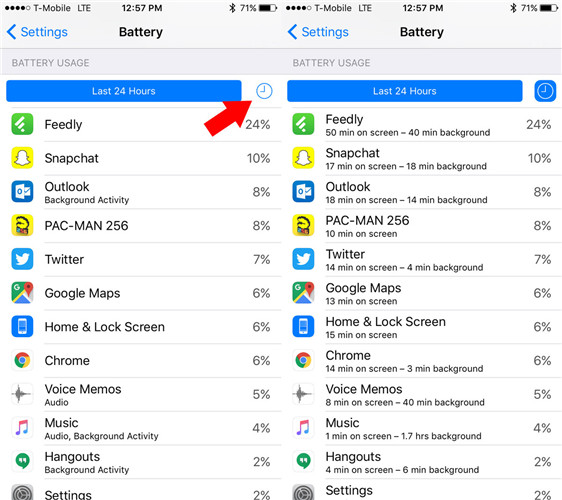
On iOS 8, it could show you which apps were using up the most battery life. While on iOS 9, Apple went a step further. The Battery Usage page (Settings > General > Battery) now breaks down app usage down to the minute as opposed to just percentage. Thus you could stop using them when you’re low on power.
Axe and manage location services
While going into Settings > Privacy > Location Service, you’ll find a list of apps using location services. Take my own as an example, the Dictionary app. Why on earth does it need to know my location. Disable as many of this kind accessing to the GPS may benefit to your longer battery life.
Disable Bluetooth
Bluetooth is great for connecting a wireless speaker, wireless headphones or Air Dropping files to other Apple devices. In general, Bluetooth uses up very little power when it’s idle, but as a wireless protocol, it’s constantly searching for devices to pair with. Turn it on when you’re using it, otherwise, leave it off.
Curb Background App Refresh
As its name suggests, this is a feature that lets apps refresh content in the background which is hard on battery. We recommend to only leave apps you need to have background refreshing (Settings > General > Background App Refresh).
Turn off the fancy animations
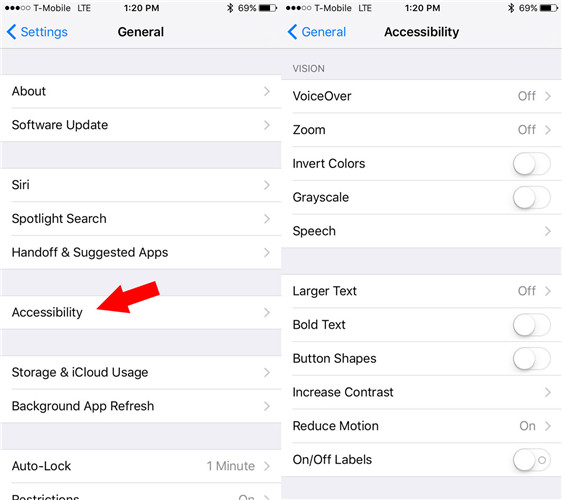
Whenver you enter and exit a folder of apps, here will present you a zoom effect. Something nauseous, why not turn it off? Go: Settings > General > Accessibility > Reduce Motion
Prune the Accessibility settings
On this regard, a few things you can adjust and conserve more power:
— switching iOS to a black and white look (Settings > General > Accessibility > Grayscale);
— reducing the white point to lower the intensity of colors (Settings > General > Accessibility > Increase Contrast);
— reducing the transparency (Settings > General > Accessibility > Increase Contrast > Reduce Transparency)
— turn off the vibrations (Settings > General > Accessibility > Vibration)
Shut down auto app updates
Simply go and flip the toggle for app updates to off: Settings > App and iTunes Stores > Automatic Downloads
Lower the brightness
Actually it’s advisable to any device with a backlit screen, as you really don’t need the screen brightness set to 100%, which is bad for your iOS device’s battery and more importantly bad to your eyes. Visit: Settings > Display & Brightness
Don’t use Live Photos as wallpapers
Live Photos, also called as “living memories” by Apple, are cute and fun to look at. But they’re also sipping power, especially when you choose to set one as lock screen wallpaper.
In fairness, negligible the tip is though, when those extra milliseconds add up over the course of a day, it could mean the difference between having 1% and 5% battery life when you really need it.
Activate Lower Power Mode
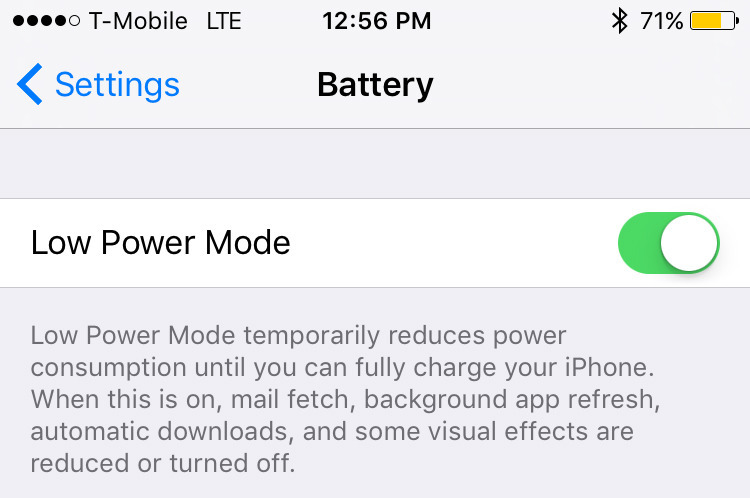
Apple says iPhones get up to one extra hour of battery life when updated to iOS 9, what a pity that it’s not including iPhone 6S and 6S Plus. That’s great, that because you can get up to three more hours battery life by switching on the new Low Power Mode (Settings > General > Battery > Lower Power Mode). Meanwhile, it will suggest you to switch to that when your battery dips to 20% or lower. And this is the one what we all Recommended Easiest Way to Save iOS 9 Battery Life.
OF COURSE, here is another
 blog.easyacc.com
Love the low power mode if I don’t have a portable power bank or a way to charge up with me. Only had to use it once but that is enough when you need to be able to access the net later on.
赞赞
great
赞赞
good advice, thanks
赞赞
Thanks I just turned off my background refresh app!!
赞赞
Activate Lower Power Mode
赞赞